0 ratings

Nº de artículo:
57412696
Microsoft Windows 10 Tips & Tricks: a QuickStudy Laminated Reference Guide (Quick Study Computer)
Nº de artículo:
57412696
CLP 19340
Price Details
Excluding Shipping & Custom charges ( Shipping and custom charges will be calculated on checkout )
*All items will import from Estados Unidos
0 ratings
Escribe una opinión
En stock
 Importado de la tienda USA
QTY:
Haz tu pedido ahora y recíbelo por ahí Sunday, Agosto 16
Secured transaction
Ubuy works hard to protect your security and privacy. Our advanced payment security system ensures confidentiality by encrypting your information during transmission using AES (Advanced Encryption Standards) and SSL (Secure Socket Layer) protocols. Your payment details are 100% secure as we do not share your payment details with third party sellers.
Our Top Logistics Partners


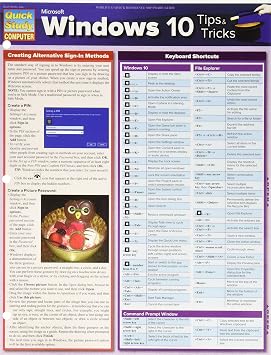
Get the most out of your computer with our quick and easy 6-page laminated guide focusing on configuration and management of your system for you

Fast
Shipping

Free
Return*

Secure Packaging

100% Original Products

PCI DSS Compliance

ISO 27001 Certified


Note: Step Down Voltage Transformer required for using electronics products of Estados Unidos store (110-120). Recommended power converters Comprar ahora.


What Stands Out
Concise Guidance
These quick study cards provide easy-to-follow tips and tricks for Windows 10, making learning efficient for users seeking help with navigation and usage without overwhelming information.
Portable Format
The card format allows for easy portability, enabling users to access crucial Windows 10 tips wherever they are, enhancing on-the-go learning and quick reference during everyday tasks.
User-Friendly Design
Designed for all skill levels, these succinct cards simplify Windows 10 features, ensuring both beginners and experienced users can maximize their understanding and improve productivity effortlessly.
Detalles de producto
- 6-page laminated guide for computer configuration and management
- Authored by Joan Lambert, an experienced corporate trainer
- Covers relevant functions for users at different levels
- Suggested uses: workplace, company training, family & shared admin, students/teachers/parents, college students
- Provides guidance on setting up and securing users
- Helps in reducing help-desk calls and improving productivity
Who Should Buy?

-
New Users
Ideal for new Windows 10 users seeking to familiarize themselves with features and shortcuts efficiently.
-
Tech Enthusiasts
Great for tech enthusiasts looking to discover hidden features and optimize their Windows 10 experience.
-
Students
Helpful for students who want quick access to Windows 10 tips that enhance productivity for studies.

-
Advanced Users
Advanced users may find the tips basic and not aligned with their in-depth understanding of Windows.
DESCRIPCIÓN DEL PRODUCTO
Microsoft Windows 10 Tips & Tricks: a QuickStudy Laminated Reference Guide (Quick Study Computer)
¿Tienes alguna consulta? Chatea con nosotros
Preguntas y respuestas de los clientes
-
Pregunta:
What is included in Microsoft Windows 10 Tips & Tricks (Quick Study Computer)?
Respuesta: This guide includes a comprehensive collection of tips, shortcuts, and tricks that enhance user experience on Windows 10. It covers topics such as system customization, security settings, productivity hacks, and troubleshooting methods. For instance, users can learn how to manage their notifications effectively or make their desktop more efficient by organizing files quickly. This makes it an invaluable resource for both beginners and seasoned users looking to maximize their productivity by leveraging the full potential of Windows 10. -
Pregunta:
Who is the target audience for Microsoft Windows 10 Tips & Tricks (Quick Study Computer)?
Respuesta: The target audience includes Windows 10 users of all skills levels, ranging from beginners to advanced users. Beginners benefit from foundational tips that familiarize them with essential features, while advanced users can explore more complex techniques to optimize their experience. Whether you are new to Windows or looking to deepen your understanding, this resource is tailored to improve your system navigation and usability. -
Pregunta:
Can I find advanced tips in Microsoft Windows 10 Tips & Tricks (Quick Study Computer)?
Respuesta: Yes, this guide offers a variety of advanced tips that cater to experienced users. These include insights on command line usage, system performance enhancement, and advanced security features. By diving into these advanced strategies, users can significantly improve overall system efficiency and security. For example, understanding the command line can streamline processes that otherwise require multiple steps through the GUI. -
Pregunta:
Is Microsoft Windows 10 Tips & Tricks (Quick Study Computer) suitable for older versions of Windows?
Respuesta: This guide is specifically tailored for Windows 10, so users of older versions like Windows 7 or 8 might not find it useful. Features, functionalities, and user interfaces differ significantly between versions, making tips aimed at Windows 10 less relevant for those using earlier systems. Users with older versions may find themselves missing out on new functionalities available only in Windows 10, thus understanding the context is crucial. -
Pregunta:
What types of tips can I expect to find in Microsoft Windows 10 Tips & Tricks (Quick Study Computer)?
Respuesta: Users can expect a variety of tips, including system shortcuts, file management techniques, application usage, and network settings. These tips are presented in an easy-to-understand format, making it simple to follow along. For instance, learning keyboard shortcuts can save you time while doing tasks, allowing you to navigate through your system more fluidly and efficiently. -
Pregunta:
How does Microsoft Windows 10 Tips & Tricks (Quick Study Computer) help with troubleshooting?
Respuesta: The guide includes specific sections dedicated to troubleshooting common Windows 10 issues. Step-by-step instructions on resolving problems such as system crashes, application errors, and connectivity issues can prove invaluable. By following tailored troubleshooting advice, users can quickly get their system back on track without needing external support, empowering them to solve issues independently. -
Pregunta:
Is Microsoft Windows 10 Tips & Tricks (Quick Study Computer) visually guided?
Respuesta: Yes, the guide contains visual aids, such as screenshots and diagrams, to complement the textual instructions. These visuals help clarify complex processes, allowing readers to follow along more effectively. For instance, seeing a visual representation of menu navigation can enhance understanding compared to text alone, particularly for users who are more visually oriented. -
Pregunta:
Will Microsoft Windows 10 Tips & Tricks (Quick Study Computer) help improve my productivity?
Respuesta: Absolutely. The collection of tips is designed to streamline tasks and enhance productivity by introducing users to shortcuts and features that they may not be familiar with. For instance, learning how to efficiently manage virtual desktops can help users keep tasks organized. This leads to quicker task execution and more effective multitasking, especially in professional settings. -
Pregunta:
Are there any tips specifically for security in Microsoft Windows 10 Tips & Tricks (Quick Study Computer)?
Respuesta: Yes, the guide features a section on security, highlighting essential practices like setting up Windows Defender, adjusting privacy settings, and the importance of regular updates. These tips can help users protect their system from threats and ensure personal information remains secure. Understanding these security measures allows users to confidently navigate the internet and avoid potential vulnerabilities. -
Pregunta:
Where can I buy Microsoft Windows 10 Tips & Tricks (Quick Study Computer) in Chile?
Respuesta: You can purchase Microsoft Windows 10 Tips & Tricks (Quick Study Computer) on Ubuy. Ubuy offers a convenient platform for acquiring this guide and provides an array of related products that can further enhance your Windows 10 experience. With user-friendly navigation and reliable customer support, Ubuy makes it easy to access this essential resource for both new and experienced users alike.
QuickStudy Editorial Review
The Microsoft Windows 10 Tips & Tricks Quick Study Computer Paperback is an essential reference for those looking to learn more about Windows 10. The keyboard shortcuts listed in the book are particularly useful. However, for those switching from Mac to Windows 10, some of the information may be superfluous. The biggest complaint about the book is that the print is too small and difficult to read, and some customers have said that they had to use a magnifier and additional lighting to be able to read it. Overall, the book provides good information and is a handy reference guide for those learning how to use Windows 10.
Customer Reviews & Ratings
1 valoraciones de los clientes
-
5 estrella
100%
-
4 estrella
0%
-
3 estrella
0%
-
2 estrella
0%
-
1 estrella
0%
Revisar este producto
Comparte tus ideas con otros clientes
ventajas
- Provides good information and helpful keyboard shortcuts
- Handy reference guide for those learning to use Windows 10
Contras
- Small print that is difficult to read
Platform Trust & Buyer Confidence

MA
Mohammad
Verified buyer
“Excellent quality and original too,when ubuy send original things I will appreciate that ,I very satisfied thank you”
23 July 2026 · via Trustpilot
CK
Chitra
Verified buyer
“The order and delivery progress was communicated very well. Package arrived within the estimated time. Products arrived as expected in good condition.”
22-Jul-26 · via Trustpilot
K
kund
Verified buyer
“Good supply of products. Safe payment methods, and shipment worldwide! Genuine products.”
23-Jul-26 · via Trustpilot
OO
Onesi
Verified buyer
“Was my first time buying a product from Ubuy, but I found it so helpful. This is reliable. Gonna place a new order!”
22 July 2026 · via Trustpilot
SJ
SAO JOHN
Verified buyer
“Ubuy is a great online platform to buy stuff. Reliable, fast delivery time and great value for money. I've been using Ubuy online shopping platform for three years now and will continue to do so.”
23 July 2026 · via Trustpilot
Pago seguro
Global Delivery
Easy Returns
Genuine Products
Product Price History
Información importante
- Limitaciones: Para los productos enviados al extranjero, ten en cuenta que cualquier garantía del fabricante puede no ser válida; las opciones de servicio del fabricante pueden no estar disponibles; los manuales del producto, las instrucciones y las advertencias de seguridad pueden no estar en los idiomas del país de destino; los productos (y los materiales que los acompañan) pueden no estar diseñados de acuerdo con las normas, especificaciones y requisitos de etiquetado del país de destino; y los productos pueden no ajustarse al voltaje del país de destino y a otras normas eléctricas (lo que requiere el uso de un adaptador o convertidor, si procede). El destinatario es responsable de asegurarse de que el producto puede ser importado legalmente al país de destino. Cuando hagas un pedido a Ubuy o a sus filiales, el destinatario es el importador registrado y debe cumplir todas las leyes y normativas del país de destino.
- No todos los productos que aparecen en Ubuy están a la venta, ya que Ubuy es un motor de búsqueda a nivel mundial. Los productos están sujetos a las normas de exportación/comercio.
CLP 19340
Haz tu pedido ahora y recíbelo por ahí Sunday, Agosto 16
This item is not restrict in my country.(Please click on above link if this item is not restrict in your country, So our team will review and allow.)
QTY:
Secured transaction
PCI DSS compliant and ISO 27001:2022 certified, with encrypted payments and full buyer protection on every order.
Our Top Logistics Partners
Fastest cross-border delivery
características y beneficios
- Quick and easy 6-page laminated guide
- Focuses on configuration and management of your system
- Suitable for users at different levels
- Reduces help-desk calls and keeps productivity flowing for a team or company
- Useful for students, teachers, parents, and college students
- Helps set up and secure family accounts
Ubuy Assurance
Experience worry-free shopping with 100% original products, PCI DSS-compliant payment security, ISO 27001-certified data protection, the fastest cross-border delivery, free returns *, and secure packaging on every order.